


.png)
If you've built apps on Salesforce before, you've probably run into this choice:
- Lightning Web Components (LWC) give you full access to the platform - data, security, Apex, UI APIs - but you can't easily use popular JavaScript libraries like React.
- A standalone React app gives you the full React ecosystem, but you lose Salesforce's built-in security. You have to handle authentication yourself, manage tokens, and wire up data access from scratch.
Until now, these were two separate paths. You either got platform power, or framework freedom - never both at the same time.
That trade-off is over.

What is Salesforce Multi-Framework?
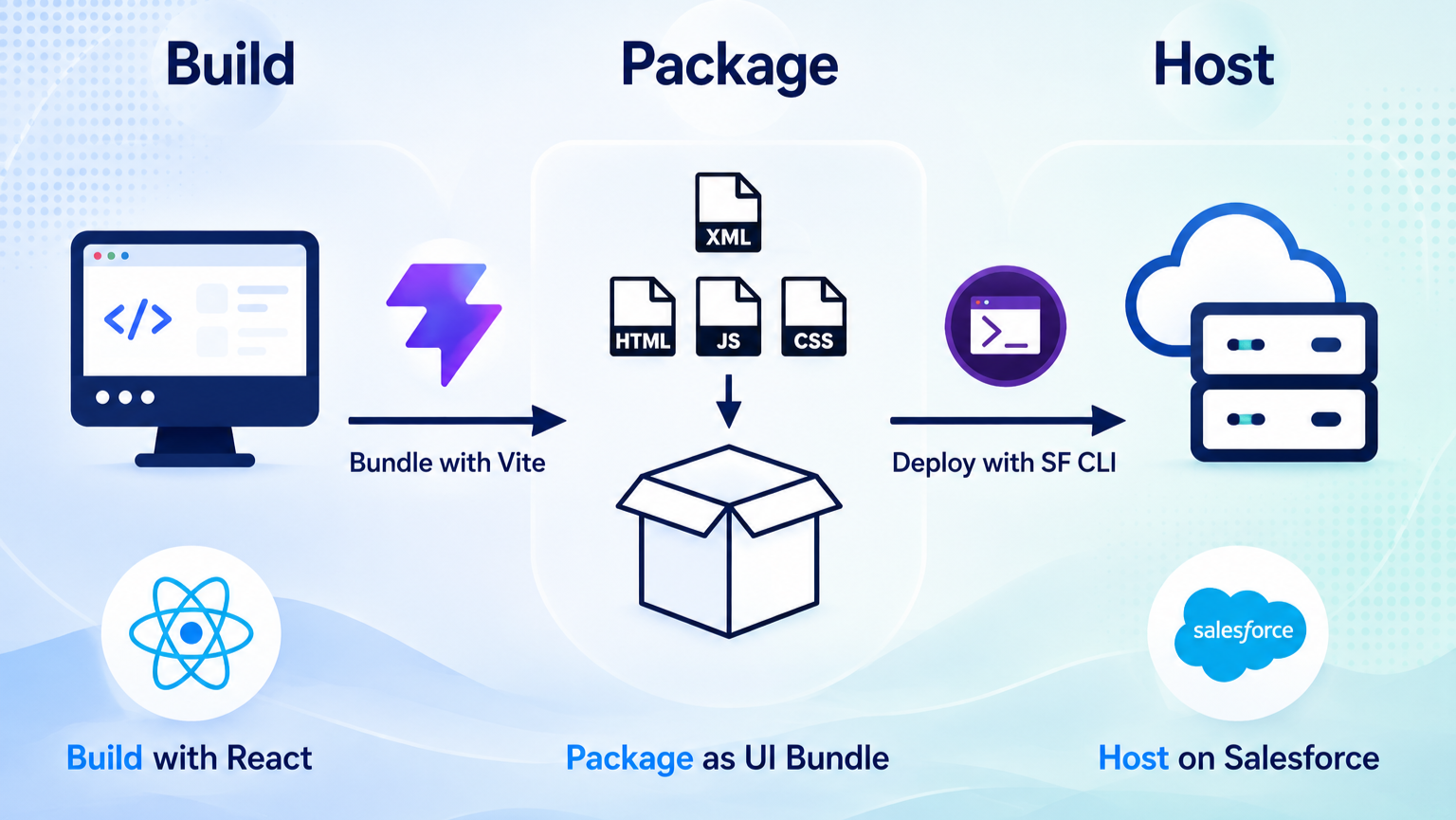
Salesforce calls this new runtime Multi-Framework. Think of it as a bridge that sits between your React app and the Salesforce platform.
Here's what it actually does for you:
- Query data with GraphQL: pull records straight from your org, no custom API layer needed.
- Call Apex methods: just like you would from LWC, React can invoke your existing Apex code.
- Read user context automatically: who's logged in, what permissions they have - all handled for you.
- No manual authentication: this is the big one. You don't write login flows or manage tokens. Salesforce's security model kicks in automatically.
In short: you write React, but it runs like a native Salesforce app - with the platform's security and governance built in, not bolted on.
This became Generally Available (GA) in July 2026, so it's no longer just for testing - you can use it in production, business-critical apps included.
React vs LWC: Which one to choose
Here's the honest answer: it's not about which one is "better" - it's about what you're building.
Choose LWC when you're building components that need to live inside Salesforce itself - on Lightning pages, Experience Builder sites, or the Salesforce mobile app. LWC gives you automatic data binding, built-in security, and components that snap together cleanly across your org. If reusability inside the Salesforce ecosystem is your priority, LWC still wins.
Choose React when you're building a self-contained app - a full single-page application or a highly customized experience - where Salesforce is mainly your data source and host, not the surface the component lives on. This is where Multi-Framework shines: you bring your existing React skills and libraries, and just plug into Salesforce for data and Apex.
A few things worth knowing before you pick:
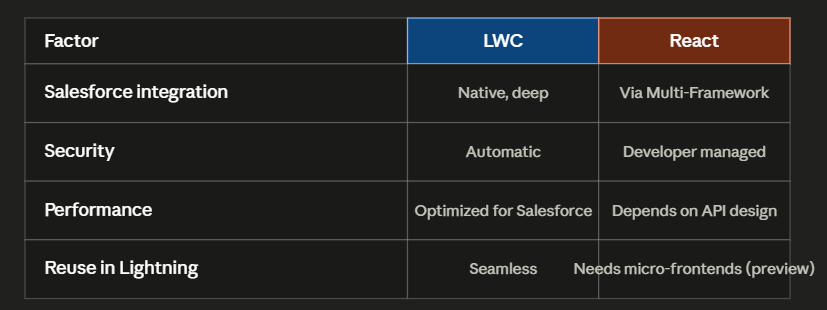
Bottom line: LWC for anything that needs to live natively inside the Salesforce UI. React for standalone apps that just need Salesforce as the backend.
What's not ready yet
Multi-Framework is powerful, but it's still early. Before you jump in, know these limits:
- No drag-and-drop placement in Lightning App Builder - you can't just drop a React component onto a Lightning page visually yet, like you can with LWC.
- Micro-frontends are still in Developer Preview - embedding React components directly inside existing Lightning pages (alongside LWC) isn't production-ready. It's being tested, not shipped.
- React is the only supported framework right now - Angular and Vue are on the roadmap, but not available yet.
- Some documentation is inconsistent - since this rolled out from beta to GA quickly, you may still find older docs referring to it as "beta" or using outdated setup steps. Always check against the current org you're deploying to before making architecture decisions.
None of this means Multi-Framework isn't ready to use - it just means it's best suited for standalone apps today, not for deeply embedding React pieces inside your existing Lightning pages.
Conclusion
Try Multi-Framework if:
- You're building a standalone internal tool or app
- Your team already knows React and wants to move fast
- You want Salesforce's security without writing your own auth
- You're okay working within today's limits (no App Builder placement yet)
Stick with LWC if:
- Your component needs to live inside existing Lightning pages
- You need drag-and-drop placement in App Builder
- You're building for Experience Builder sites or mobile right now
- You need something fully production-proven today, without any beta-adjacent rough edges
Multi-Framework doesn't replace LWC - it just gives React developers a real, secure way onto the Salesforce platform, without giving up the platform's built-in protections. For internal tools especially, it's worth trying today. For deep Lightning integration, LWC still holds the edge - for now.