

.png)
Fault Path in Salesforce Flow
A fault path in Salesforce Flow is a feature that allows you to handle errors or exceptions that occur during the execution of a flow element. By configuring a fault path, you can define specific actions to run when an error happens, ensuring the flow manages failures gracefully instead of stopping unexpectedly.
Why Use a Fault Path?
Without a fault path, if a flow encounters an error, the entire transaction fails. The user may see a generic red error message, or the administrator may receive a “Flow Application Error” email. This often makes troubleshooting difficult and creates a poor user experience.
By using a fault path, you can:
- Display a meaningful, user-friendly error message instead of a system-generated one.
- Create a log record to capture details about what went wrong for easier debugging.
- Send notifications (such as email or Chatter posts) to alert an administrator immediately.
- Redirect the user to another screen or guide them through a recovery process.
When can you NOT use a Fault Path?
1. Before-Save (Fast Field Update) Flows -> Fault paths are not available in before-save flows because these flows only allow field updates on the triggering record.
2.Loops/Assignments: Standard logic elements such as Assignments, Decisions, and Loops do not support Fault Paths because they do not perform database operations or external interactions.
Examples of elements that support Fault Paths:
- CRUD operations (Create, Update, Delete Records), Apex Actions, Subflows etc.
Error Logging Variables->
When a Flow fails, you don’t just want to know that it broke—you want to know why, when, and who. Use these global variables in your Fault Path to capture the full story:
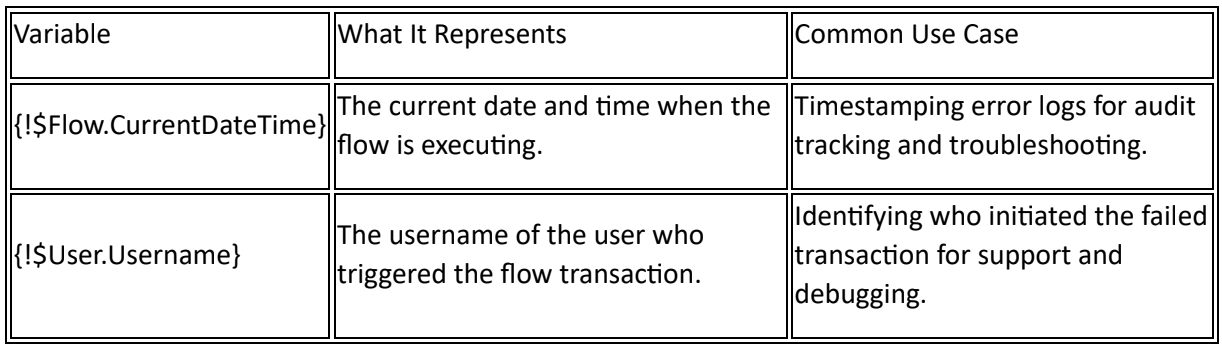
Here is a example.
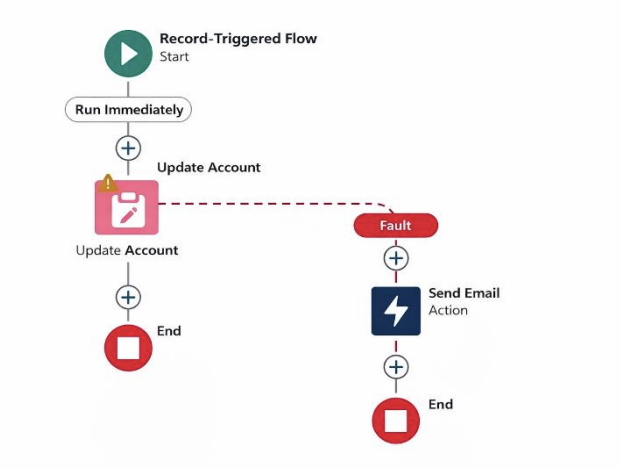
- Start (Record-Triggered Flow): The flow runs automatically when a Contact is created.
- Update Account: The flow attempts to update a related Account field (for example, Total_Amount__c).
- Success Path: If the Account update succeeds:
- The flow continues normally.
- It reaches End.
- No issues occur.
Fault Path
If the Account update fails (for example, required field missing or validation rule error):
- The flow follows the Fault Path (red dashed line).
- It triggers Send Email action.
- The email contains the error message.
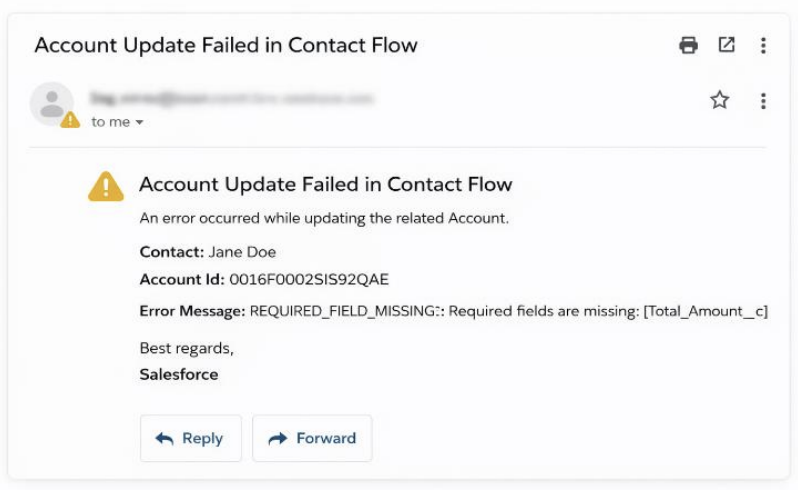
Final result-Got this email.