



In today’s fast-paced business environment, sales teams rely heavily on Customer Relationship Management (CRM) platforms like Salesforce to manage leads, deals, and customer interactions. However, traditional paper-based contract processes can create bottlenecks, delaying deals and increasing administrative overhead. Integrating e-signature solutions with Salesforce addresses these pain points by enabling seamless digital signing directly within the CRM workflow. This not only accelerates sales cycles but also enhances compliance and data security. From contract approvals to onboarding new clients, such integrations transform how organizations handle agreements, making them more efficient and customer-centric.

Why Salesforce Integration Matters for E-Signatures
Salesforce serves as a central hub for business operations, housing critical data on opportunities, accounts, and contacts. Without integration, teams often switch between tools—uploading documents to an e-signature platform, tracking status manually, and updating Salesforce records post-signature. This fragmentation leads to errors, lost productivity, and compliance risks. By embedding e-signature capabilities into Salesforce, users can initiate, track, and complete signatures without leaving the platform, automating notifications and syncing signed documents back to records.
Popular E-Signature Providers Compatible with Salesforce
Several e-signature vendors offer native or app-based integrations with Salesforce, available via the AppExchange marketplace. These solutions vary in features, pricing, and ease of setup, allowing businesses to choose based on scale, budget, and specific needs. Below, we examine key players, focusing on their Salesforce compatibility.
DocuSign for Salesforce
DocuSign is a market leader in e-signatures, with a robust native integration that embeds signing workflows directly into Salesforce objects like Opportunities and Accounts. Users can map fields from Salesforce to DocuSign envelopes, sending documents direct from the relevant salesforce record and retrieve completed documents with metadata synced back to salesforce record.
.png)
Adobe Sign for Salesforce
Adobe Sign, part of Adobe Document Cloud, provides a seamless Salesforce integration that leverages Adobe’s ecosystem for PDF handling and form automation. It allows users to send agreements from Salesforce records, track status in real-time, and attach signed PDFs automatically. The integration excels in conditional logic for dynamic forms and supports integrations with other Adobe tools like Acrobat for editing.
.png)
HelloSign (Now Dropbox Sign) for Salesforce
HelloSign, rebranded as Dropbox Sign, offers a user-friendly integration that focuses on simplicity and collaboration. It enables embedding signers’ journeys into Salesforce, with automatic updates to record fields upon completion. Key strengths include reusable templates, team sharing, and integration with Dropbox for secure storage.
.png)
Panda doc for salesforce
PandaDoc revolutionizes document workflows inside Salesforce by combining professional proposal creation, dynamic pricing tables, and seamless e-signatures—all without leaving your CRM.
Unlike traditional tools, PandaDoc pulls Opportunity data (contacts, products, pricing) directly into branded templates, enables real-time two-way sync, and tracks every document interaction back in Salesforce records. Sales teams cut proposal creation from hours to minutes while maintaining pixel-perfect branding and compliance-ready audit trails.
.png)
Conga Sign for salesforce
Conga Sign is an eSignature application made specifically for Salesforce customers. Users can initiate an eSignature process from any object in Salesforce using pre-defined templates or by adding signature tags in real-time. Then they select up to 10 recipients, set the signing order, and deliver the document to be signed. All signing activity is tracked and updated in Salesforce, the result being a legally valid electronic signature.
.png)
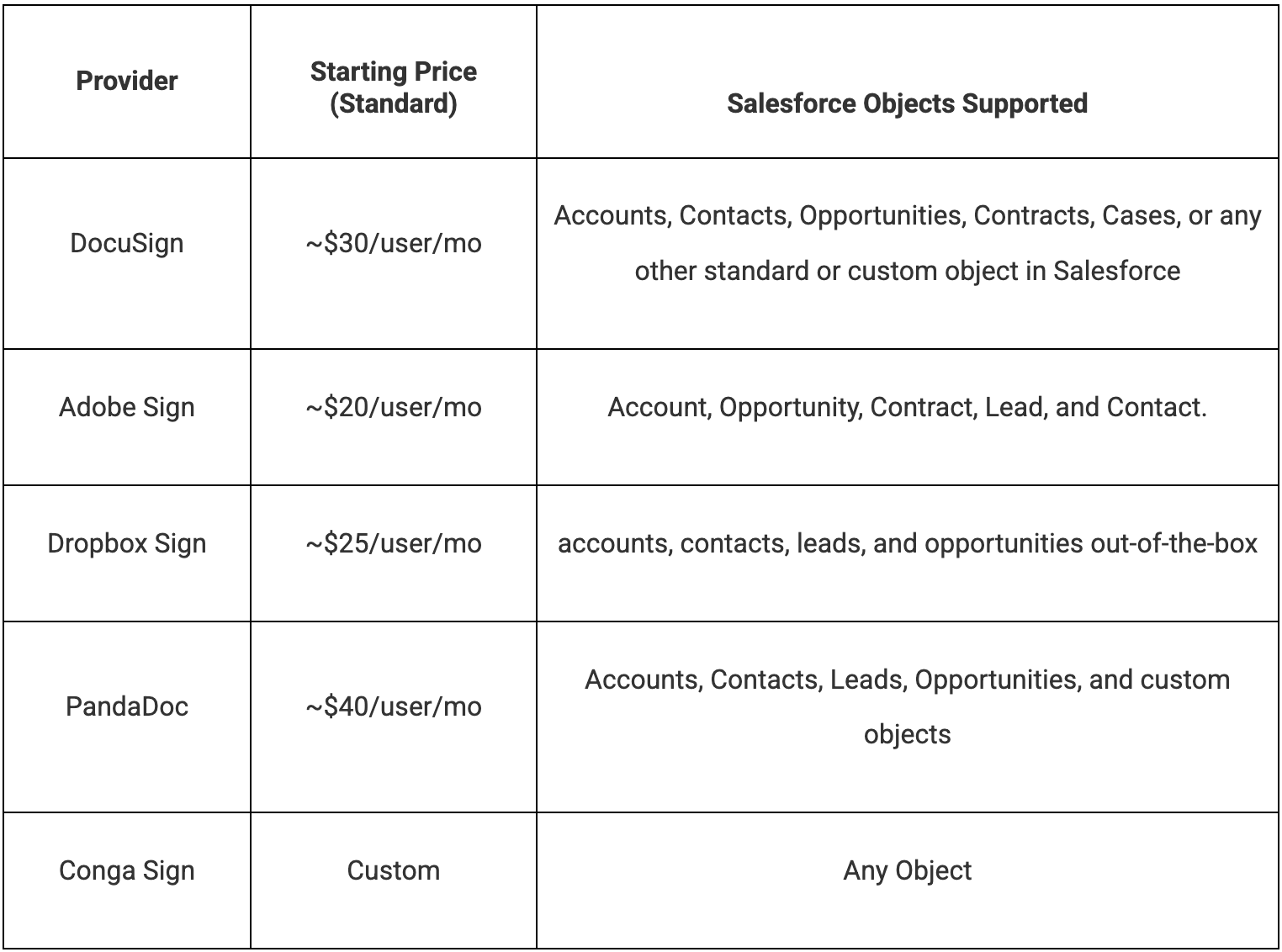
E-Signature Providers: Pricing & Salesforce Object Support Comparison
How E-Signatures Work Seamlessly Inside Salesforce
1. Send Contracts Without Leaving Salesforce
Your sales team generates and sends contracts directly from Opportunities or Accounts. No downloading PDFs. No attaching files to emails. No version controls nightmares. Salesforce stays the source of truth from the moment you create the contract to the moment it's signed.
2. Required Fields Are Automatically Enforced
Signature fields, dates, and mandatory inputs are built into the template. This means no more incomplete contracts coming back, no missing signatures, and no "Can you re-sign this?" emails. If the document isn't complete, it can't be submitted. Simple as that.
3. Real-Time Status Tracking
Want to know where a contract stands? Just look at the Salesforce record:
- Sent
- Viewed
- Signed
- Completed
Your reps know exactly when to follow up. Managers see accurate pipeline status without asking. And operations stop maintaining separate tracking spreadsheets.
4. Frictionless Signing for Your Customers
Your customers can sign from their desktop, tablet, or phone. No creating an account. No printing and scanning. No "I'll get to it later" because it's too much hassle.
Removing friction at this final step shortened our sales cycle immediately—and customers appreciated it.
5. Automatic Storage with Full Audit Trail
Once a contract is signed, it's automatically attached to the Salesforce record. A complete audit trail is generated for compliance. Everything is searchable, secure, and permanently stored. No more digging through email to find that signed agreement from six months ago.
Conclusion
Embedding e-signatures in Salesforce transforms fragmented contract chaos into a seamless revenue machine—eliminating email ping-pong, spreadsheet nightmares, and stalled deals while delivering 30% faster sales cycles, 5+ hours/week saved per rep, and 100% pipeline visibility with bulletproof compliance. When contracts live where your deals do, you don't just sign faster—you control your entire revenue execution from a single CRM pane of glass.